Five Workflow Patterns to Multiply Your Development Capacity with AI Coding Assistants

Everyone is finally waking up to the value that AI coding assistants bring. Last week, LinkedIn was awash with people waxing lyrical about Boris Cherny's approach to AI-assisted development - Claude Code, Claude web, Claude mobile - all working in parallel to build something transformational. Ironically, a new product from Anthropic, Claude Work, was itself built using Claude in just 10 days. That's the capability we're talking about.
But if you're just getting started with coding assistants, the sheer range of possibilities can feel overwhelming. Having a clear guide to understand the variations and knowing which approach fits which situation, is genuinely valuable.
At WeBuild-AI, we've been putting these workflow patterns to the test across enterprise software delivery lifecycles (SDLCs) since our inception. Not in sandbox experiments, but in real client engagements where delivery timelines, code quality, and team velocity actually matter for regulated products and propositions. We’ve covered everything from banking apps and insurance products to regulatory reporting and learned that the philosophy underneath matters more than the tooling or model itself.
Here are five workflow patterns that put this philosophy into practice, all of which have come from our engineering team.
(At the end of the blog we’ve included a link to a new open source project on GitHub containing a whole host of helpful Claude Code slash commands, utilities and frameworks.)
Pattern 1: Vertical Flow with Horizontal Brainstorming
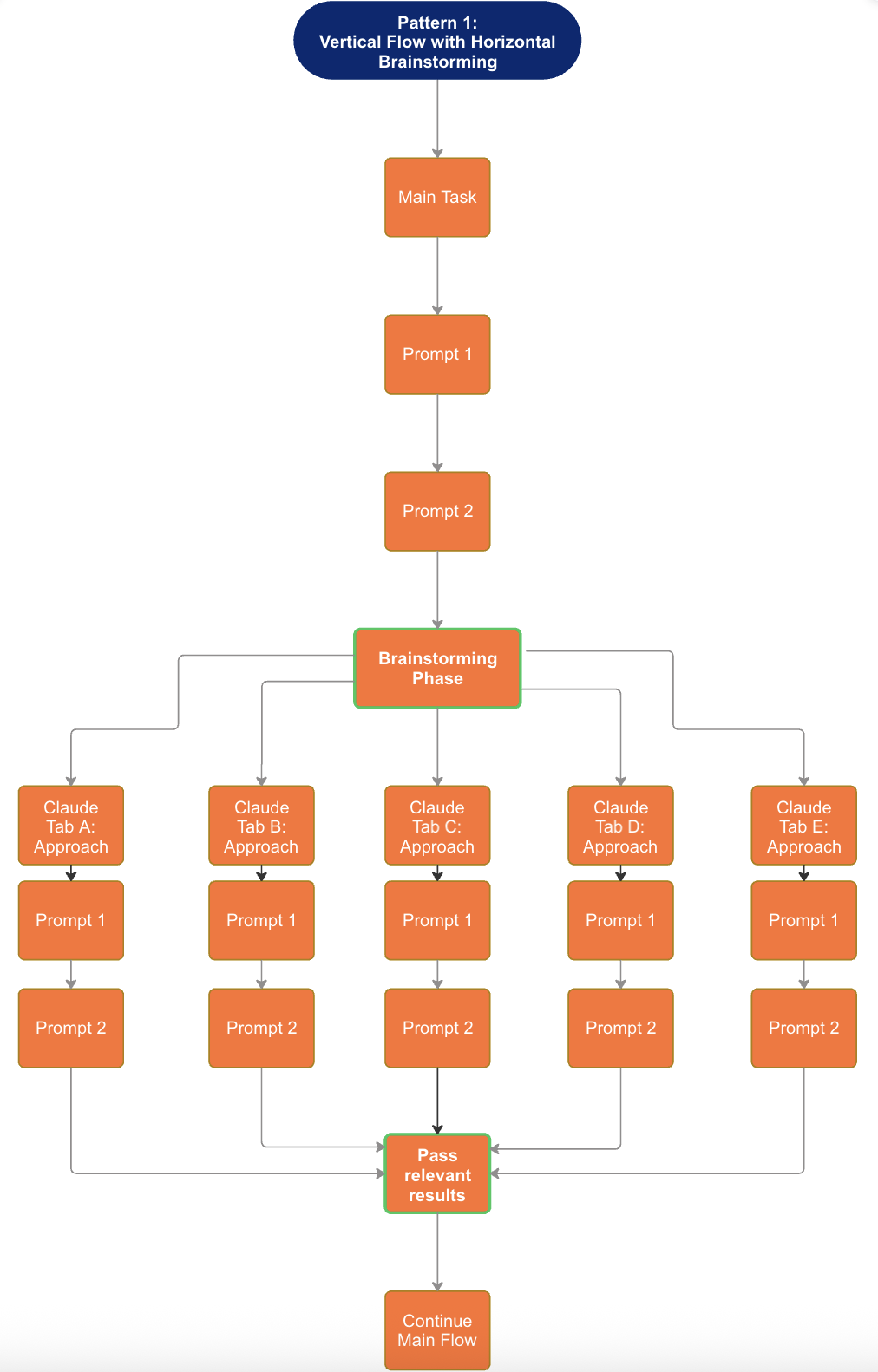
The structure: Your main task flows vertically through a sequence of prompts. At a designated brainstorming phase, you branch horizontally, spawning 5 parallel Claude tabs, each exploring a different approach to the same problem. Each tab works through its own prompt sequence independently. You then collect the relevant results and feed them back into your original flow.
When to use it:
Architectural decisions where multiple valid approaches exist.
Solving novel problems without clear precedent.
Exploring trade-offs before committing to implementation.
Design sessions where you want diverse perspectives.
Why it works: Traditional brainstorming is sequential. You think of one idea, evaluate it, then another. This pattern parallelises exploration. Five approaches investigated simultaneously means you compress hours of solo thinking into minutes. More importantly, seeing multiple solutions side-by-side often reveals hybrid approaches you wouldn't have discovered linearly.
Practical application: You're designing a new authentication system. Instead of iterating through options one by one, you spin up five Claude tabs: one explores OAuth patterns, another looks at session-based approaches, a third investigates token architectures, a fourth examines passwordless options and a fifth considers hybrid models. Each develops its approach for 10-15 minutes. You review all five, extract the best elements and continue with a solution that's stronger than any single path would have produced.
Pattern 2: Parallel Preparation with Checkpoints
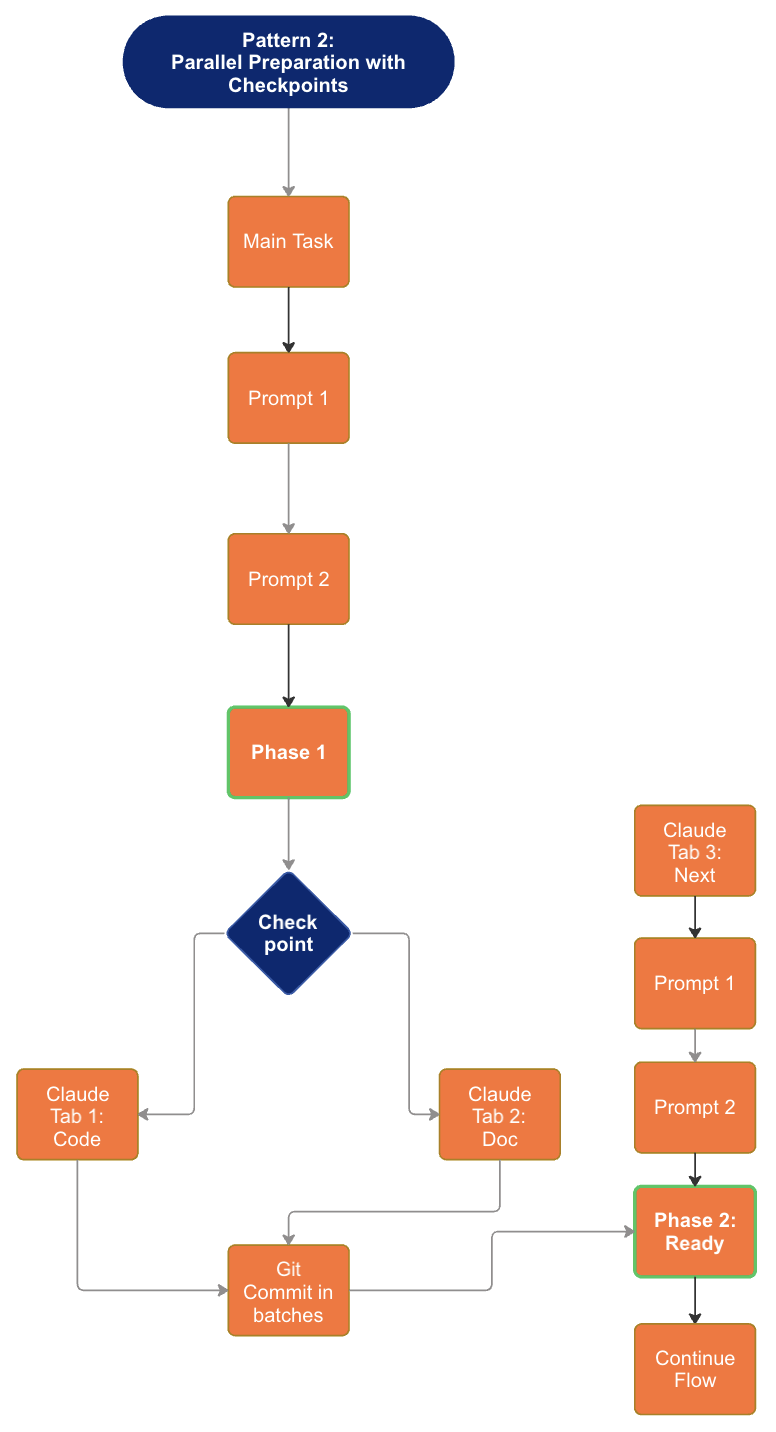
The structure: This is a more incremental approach. Your main task progresses through prompts until it reaches Phase 1 completion. At a checkpoint (the decision diamond), you spawn parallel Claude tabs for different supporting activities: code review in one tab, documentation updates in another, a fresh context tab for the next phase. Work proceeds in parallel, with git commits happening in batches. Once Phase 2 is ready to proceed, the flow continues.
When to use it:
Complex features requiring multiple types of deliverables.
Work that needs review gates before proceeding.
Tasks where documentation must stay synchronised with code.
Iterative development with clear phase boundaries.
Why it works: Most development workflows treat code, tests, documentation and review as sequential activities. This pattern recognises they can happen concurrently. While one Claude handles the next implementation phase, another reviews what was just built and a third updates the documentation. The checkpoint ensures quality gates are met before moving forward.
Practical application: You're building a new API endpoint. Phase 1 completes the basic implementation. At the checkpoint, you spawn three parallel activities: Claude Tab 1 reviews the code you just wrote for edge cases and security issues, Claude Tab 2 updates the API documentation with the new endpoint and Claude Tab 3 (fresh context) begins planning Phase 2 enhancements. Commits happen in batches as each parallel stream completes, and you proceed once the checkpoint criteria are satisfied.
Pattern 3: Parallel Development Tracks (Spec-Driven with Git Branching)
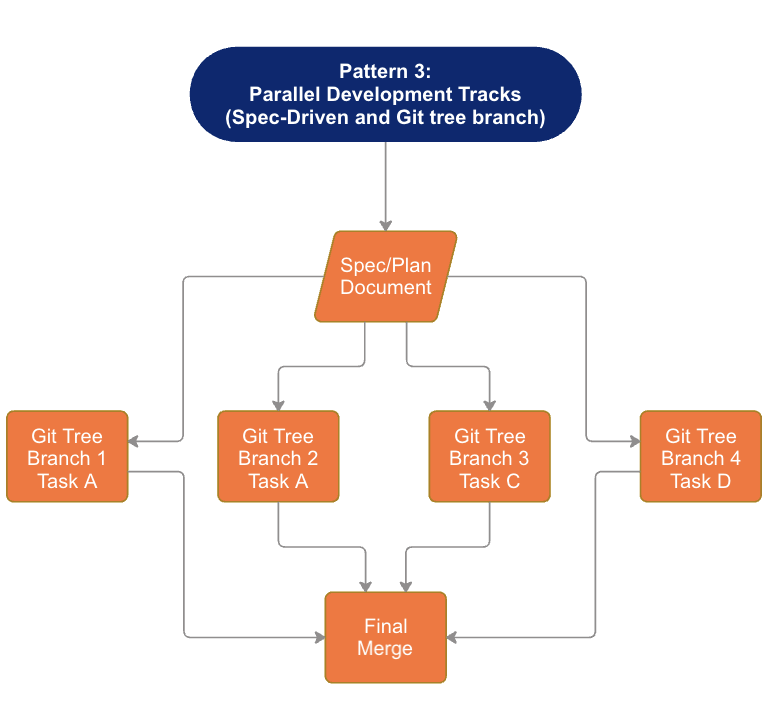
The structure: You start with a Spec/Plan Document that defines the complete scope. This branches into 4 parallel git tree branches, each with its own dedicated Claude tab working on a distinct feature (Feature A, B, C, D). Each track operates independently with its own task and development context. All branches converge at a final merge point.
When to use it:
Feature work that can be cleanly decomposed.
Sprint planning where multiple stories can progress simultaneously.
Situations where you (or your team) can context-switch between streams.
Projects with clear interfaces between components.
Why it works: This mirrors how high-functioning teams operate: parallel workstreams with clear ownership and defined integration points. The spec document serves as the contract that keeps parallel tracks aligned. Each Claude tab maintains full context for its feature without polluting the others.
Practical application: You're building a dashboard with four distinct widgets. Your spec defines the interface contracts and data shapes. Branch 1 + Claude Tab 1 builds the analytics widget. Branch 2 + Claude Tab 2 handles the notifications panel. Branch 3 + Claude Tab 3 creates the activity feed. Branch 4 + Claude Tab 4 develops the settings component. Each operates in isolation, following the spec. When all four complete, you merge and integrate.
Pattern 4: Async Parallel Spec/Plan Generation

The structure: Your Spec/Plan Document lives in a shared markdown file. Five Claude tabs work asynchronously on different sections of the same document, each responsible for developing a distinct portion of the spec. Updates consolidate back to the same document iteratively. The async nature means tabs don't need to wait for each other.
When to use it:
Large specification documents that span multiple domains.
Planning sessions where different expertise areas need input.
Documentation projects with distinct sections.
Any collaborative document creation at scale.
Why it works: Writing comprehensive specs is time-consuming because different sections require different thinking modes. Technical architecture, user experience flows, data models, integration requirements: each demands focused attention. This pattern parallelises the cognitive load while maintaining document coherence through the shared artifact.
Practical application: You're creating a product requirements document for a new feature. Claude Tab 1 develops the user story and acceptance criteria section. Tab 2 writes the technical architecture section. Tab 3 handles data model and API specifications. Tab 4 addresses security and compliance requirements. Tab 5 documents integration points and dependencies. Each works asynchronously, periodically consolidating updates to the master document. You orchestrate and resolve any conflicts between sections.
Pattern 5: Parallel Plan Generation at Scale
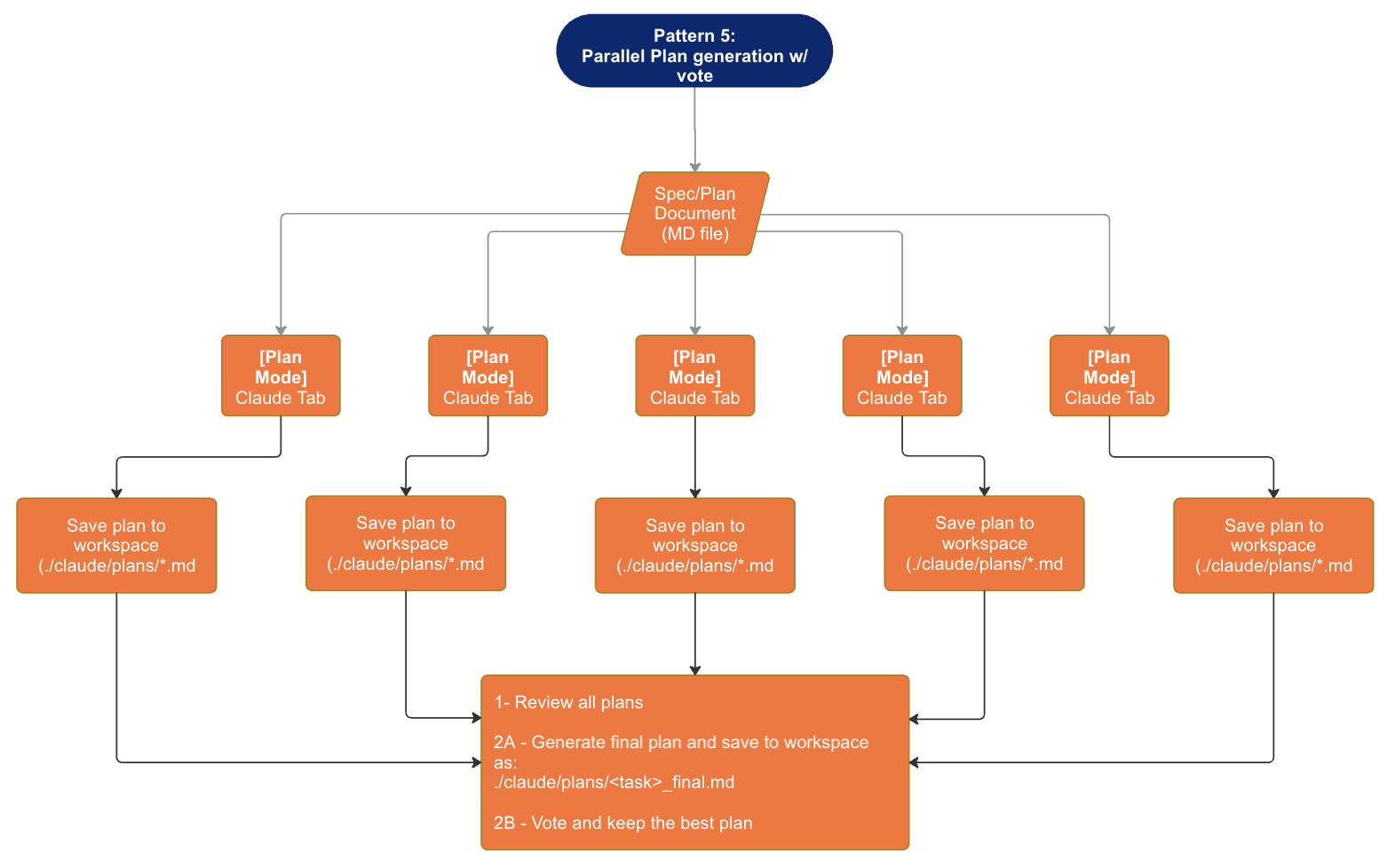
The structure: This pattern introduces multiple variations deliberately. You use Plan Mode across 5+ parallel Claude tabs, each generating its own complete plan for the same objective. Each tab saves its plan to a workspace with timestamps (following a naming convention like /docs/plans/plan_<timestamp>.md). You then review all generated plans together, synthesize the best elements, and generate the final consolidated plan.
When to use it:
High-stakes decisions requiring multiple perspectives.
Complex problems where the optimal approach isn't obvious.
Situations where you want to stress-test a plan before committing.
Strategic planning that benefits from adversarial thinking.
Why it works: A single Claude generating a single plan gives you one perspective shaped by how you framed the initial prompt. Running five parallel plan generations (potentially with slightly different framings or emphases) surfaces approaches you wouldn't have considered. The variations reveal assumptions, expose edge cases, and often produce hybrid solutions superior to any individual plan.
Practical application: You're planning a major system migration. You spin up five Claude tabs in Plan Mode, each tasked with generating a complete migration plan. Perhaps you vary the constraints slightly: Tab 1 optimises for speed, Tab 2 for minimal risk, Tab 3 for cost efficiency, Tab 4 for team learning, Tab 5 for customer impact minimisation. Each saves its plan to your workspace. You review all five, identify common elements (these are likely essential), note divergences (these represent trade-off decisions) and synthesise a final plan that balances the considerations more effectively than any single-perspective plan could.
The Compounding Effect
Boris's workflow is about compounding.
Parallel execution compounds time. Five streams running simultaneously create space for iteration and refinement that sequential work never allows.
Good planning compounds the success rate. The upfront investment in solid plans means Claude one-shots implementations more often. Fewer failed attempts means faster overall delivery.
Shared learning compounds knowledge. When you're reviewing outputs from multiple parallel streams, you're learning faster. Patterns emerge. Best practices surface. Your intuition for what works sharpens.
The new basis of competition is how quickly you turn that coding speed into customer value, product quality and market position.
Getting Started
Start with what matches your current work and what feels right for the task ahead:
If you're doing exploratory work: Try Pattern 1 (Horizontal Brainstorming) on your next architectural decision.
If you're building features with multiple deliverables: Experiment with Pattern 2 (Parallel Preparation with Checkpoints).
If you have cleanly decomposable work: Pattern 3 (Parallel Development Tracks) maps naturally to feature branches.
If you're writing specs or documentation: Pattern 4 (Async Parallel Spec Generation) can dramatically accelerate comprehensive documents.
If you're making high-stakes decisions: Pattern 5 (Parallel Plan Generation at Scale) gives you multiple perspectives before you commit.
The key insight is that AI coding assistants are faster and more scalable developers. The bottleneck shifts from execution to orchestration. Your job becomes less about doing the work and more about directing, reviewing and synthesising multiple parallel workstreams. That's a different skill - but it's a learnable one. And the organisations that develop it will operate at a fundamentally different level of capability than those still treating AI as a single assistant waiting for instructions.
Get the Toolkit
At the top end of the blog, we mentioned Bruno's open source project and here it is. The Claude Toolkit is a collection of 25 specialised slash commands, 8 reusable prompt templates, 10 JSON schemas and real-world workflow examples that we've refined through our enterprise engagements.
Whether you're looking to streamline Git workflows, improve code quality checks, generate documentation, or simply get a head start on the patterns we've outlined above, this toolkit gives you practical building blocks to work with.
Explore the Claude Toolkit on GitHub →
Clone it, adapt it, make it yours. And if you build something useful on top of it, we'd love to hear about it. Tag us on LinkedIn @WeBuild-AI.